The problem
A desktop with no Bluetooth of its own cannot reach the headphones already paired with your phone. A USB dongle fixes that and creates a new problem: when a call comes in, the PC keeps playing into your ears, because nothing inside a dongle can hear the phone ring.
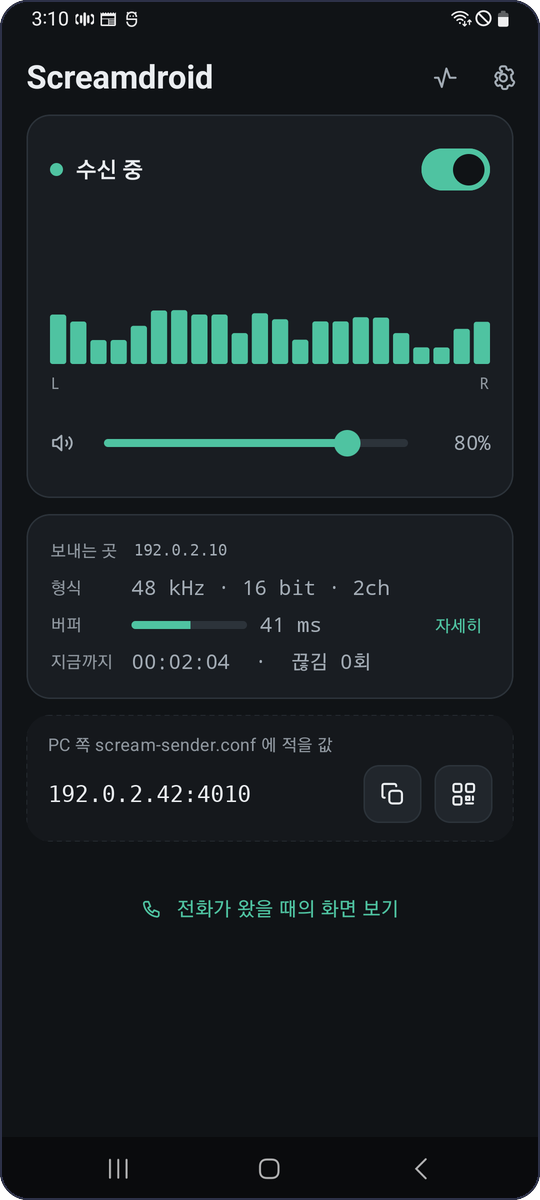
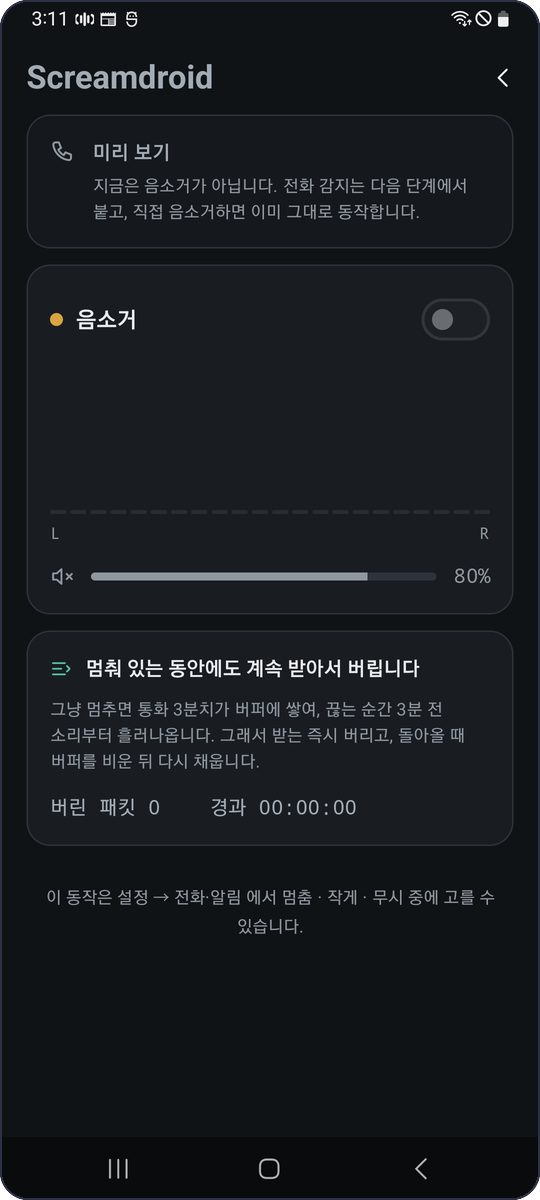
Screamdroid puts the receiver on the phone, which is the one place that knows. The PC sends its audio over Wi-Fi, the phone plays it through whatever is already paired, and an incoming call silences the stream and hands it back by itself when the call ends.
What it does
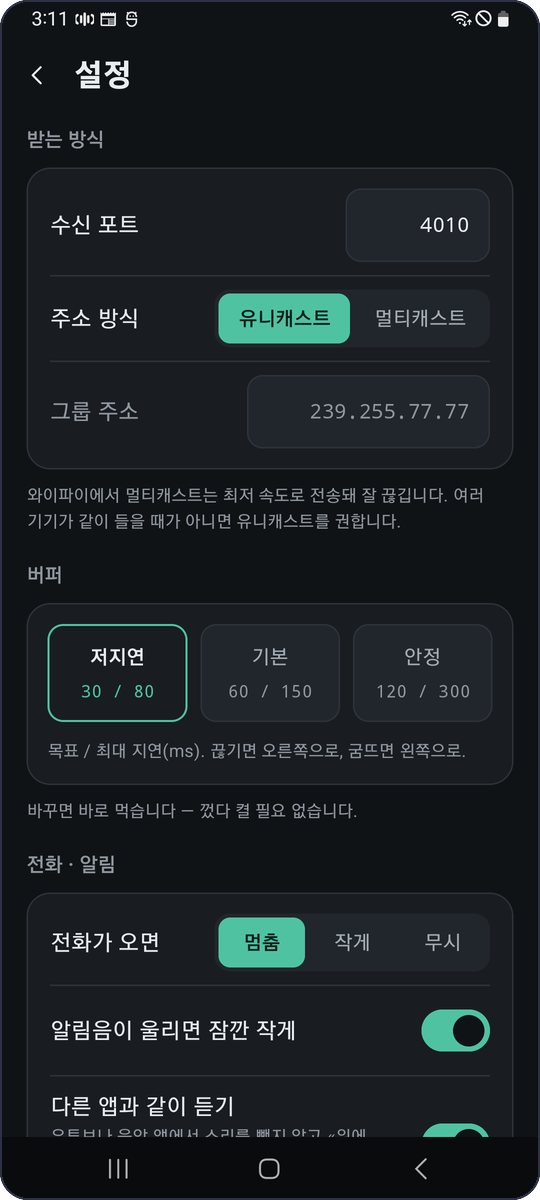
- Receives Scream audio over UDP, unicast or multicast, on a port you choose.
- Plays through whatever the phone is using: speaker, wired, Bluetooth.
- An incoming call mutes it and it comes back on its own — roughly a second later.
- Keeps running with the screen off, as a foreground service with a notification you can operate.
- Three buffer presets, from ~30 ms to a safe one for a busy network; the device buffer is opened small rather than walked down, which is what makes the low-latency preset mean something.
- Optionally plays alongside other apps instead of taking the speaker from them.
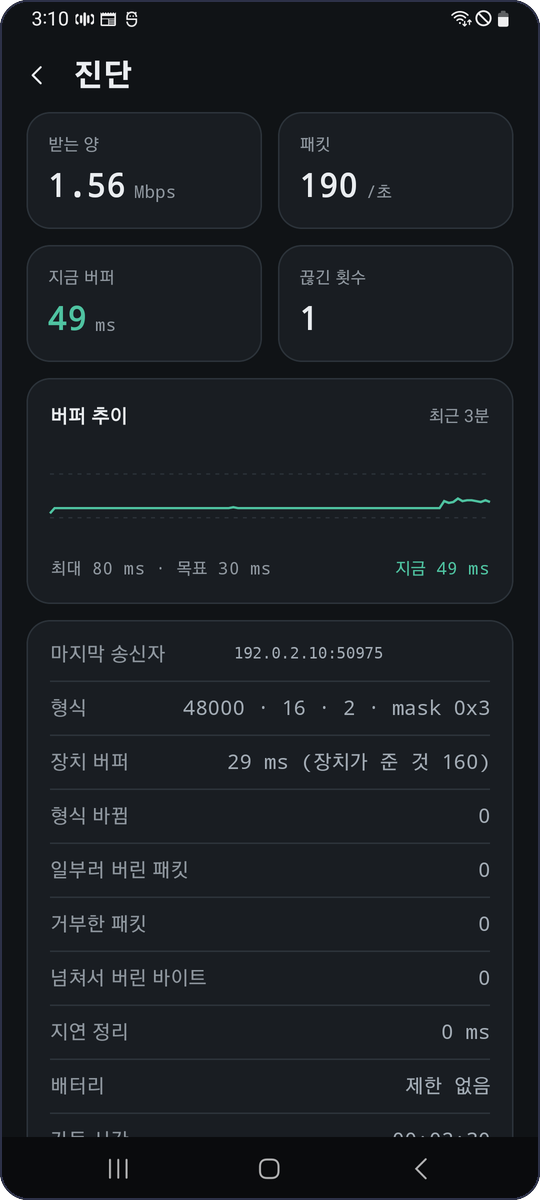
- A diagnostics screen: throughput, packets, buffer trend, dropouts, and a short event log — because network audio is mostly "why can I not hear it".
Install
- It is on Google Play, on the internal testing track.
Want in? Email the Google account address you would install it with to
zirize@gmail.com— not in a public issue, so your address does not end up on a public page. You go on the tester list and the install link comes back; the link starts working once you are on that list, not before. It has to be the account that is on the phone: Play matches the tester list against whoever opens the link, and any other address just says the app is not available. The address is used for that and nothing else — the app itself collects nothing (privacy policy). Android 8.0 or newer. - Rather not hand over an address? Build it from source:
bash scripts/build.sh installwith a phone connected. - Open the app and follow the three steps it shows on first launch.
- On the PC, point a Scream sender at the address the app displays.
No APK is published here, and that is deliberate. An APK carries the certificate it was signed with, and a certificate carries the name and address of whoever made it — readable by anyone who has the file, with one command and no password. What a store hands you is signed with the store's own key instead, so none of that travels with it — which is the way this goes out.
The two things that bite
1. Battery use has to be unrestricted
Otherwise the phone is free to freeze the app once the screen has been off for a few minutes. Audio then stops arriving and does not come back until the phone is unlocked — a foreground service, a wake lock and a Wi-Fi lock do not prevent it. The app checks this and says so on its main screen, with a button to the page that grants it (App info → Battery → Unrestricted).
It is worth knowing why this is easy to miss: a sender that stops transmitting through silence leaves the phone nothing to do, and nothing to do is the condition for going idle. A charger hides it too, because a plugged-in phone does not idle at all.
2. Silence and "not arriving" look the same
A sender with silence suppression stops transmitting when the PC goes quiet, so a gap on the wire is the normal case rather than a fault. The receiver therefore never treats one as a disconnection — and the app cannot tell you which of the two it is. That is why it says "waiting" rather than "disconnected", and why the notification names both possible reasons.
The sending side
Any Scream sender works, on Windows or Linux — the wire format is unchanged. On Linux,
pipewire-scream creates a virtual sink and
sends everything played to it; point its ip at the phone:
context.modules = [
    { name = libpipewire-module-scream
      args = { ip = "192.0.2.42", port = 4010 } }
]
Mixing several sources on the PC is worth doing: the phone then receives one stream, one output track and one clock to follow, instead of one of each per source.
How it works
Two threads and a ring buffer. One reads the socket and writes into the ring; the other reads the
ring and writes to AudioTrack. They never wait for each other, and everything the app
knows about how well it is going comes from counters moving between them. Latency is the ring plus
the device's own buffer — measuring only the first is how a receiver ends up reporting 30 ms while
the sound is a fifth of a second late. There is no native code: playback is AudioTrack,
so the build needs no NDK.
The architecture, the protocol and what was deliberately not copied from earlier receivers are written up in the repository: architecture.md, protocol.md, prior-art.md.
Requirements
| What | Value |
|---|---|
| Android | 8.0 (API 26) or newer |
| Audio format | 16-bit PCM, mono or stereo, any sample rate the device accepts |
| Network | Wi-Fi on the same network as the sender; unicast recommended |
| Permissions | Network, Wi-Fi state, wake lock, notifications. No account, no location, no analytics |
Privacy
The app collects nothing and sends nothing anywhere: it opens a UDP port, plays what arrives, and keeps its settings on the device. Privacy policy.
Licence
Apache-2.0. The receiver was written from the published Scream packet format rather than from an existing implementation, which is what makes that licence possible — see prior-art.md.